Massive MIMO Channel Model For mmWave


Massive MIMO Channel Model For mmWave

5.1. Introduction

A fundamental feature of mm wave propagation is high free-space pathloss, which introduces small amount of spatial selectivity or scattering of propagated signal paths. Large, densely packed antenna arrays, on the other hand, provide high-level antenna correlation. The widely used extended Saleh Valenzuela model (clustered channel model), that helps us to capture features accurately across Mm Wave channels.
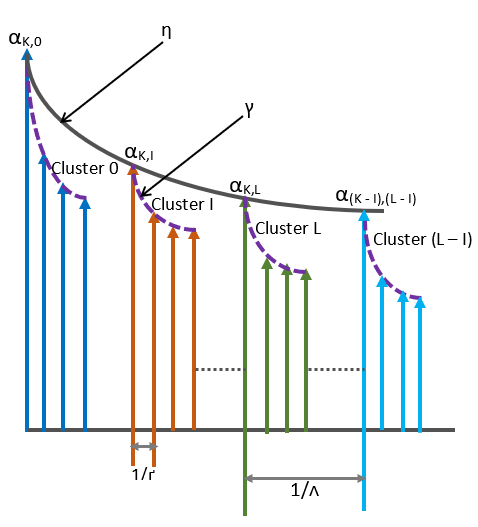
Fig 5.1: Saleh Valenzuela Channel Model distinguishing the cluster arrivals from the ray arrivals

5.2. Saleh Valenzuala Channel Model

Here in figure 5.1, it is shown Saleh Valenzuela model is basically based on amplitude and time delays of clusters and it is due to multi-paths between Tx & Rx. In figure the kth multi-path is forming many clusters like, cluster 0, cluster 1, etc., and each cluster contains rays.

Clusters are reaching at receiver at an average decay rate and similarly, rays or MPCs in each clusters are also forming in an average decay rate. The arrival rate of clusters and MPCs within each cluster is assumed to be governed by poisson distribution process (Meijerink, 2014).

Here, symbol ‘Λ’ representing the rate of clusters in unit time and ‘Γ’ represents the ray arrival rate in unit time.

When using the clustered channel model, the channel matrix H is supposed to be the sum of the contributions in the propagated multi-paths. As a result, channel matrix H can be expressed as 30

…………(5.1)

(El Ayach, 2014)

Where,Ʌt (ϕtil θtil)= Gain of antenna elements at corresponding departure angles at tx

Ʌr (ϕril θril)= antenna element gain at the corresponding angles of arrival at rx

ar(ϕril θril)=normalized response vectors of antenna arrays at receiver with azimuth (elevation) angle of ϕril ( θril) and ϕtil ( θtil) respectively

ar(ϕril θril)=normalized response vectors of antenna arrays at receiver with azimuth (elevation) angle of ϕril ( θril) and ϕtil ( θtil) respectively

5.3. Different types of antenna arrays and their array response

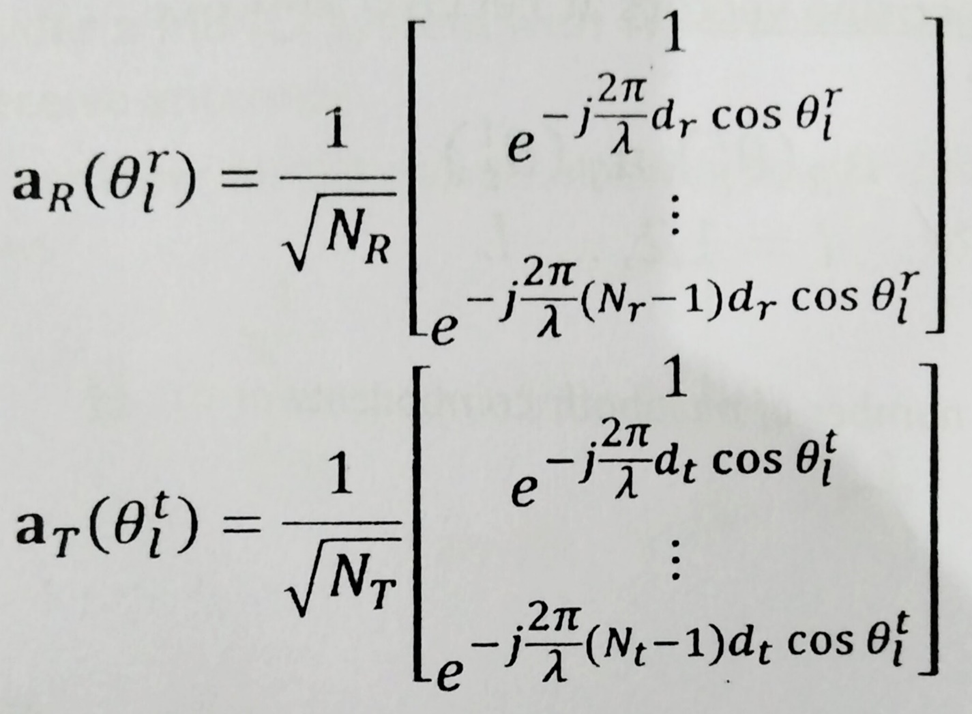
The array response vectors for uniform linear arrays (ULA) with elements, N are represented as

……….(5.2)

Similarly, for Uniform Planer arrays (UPA), the array response vectors can be represented as,

………..(5.3)

(Appendix A)

Where 0 ≤ x ≤ W1 -1 and 0 ≤ y ≤ W2 -1
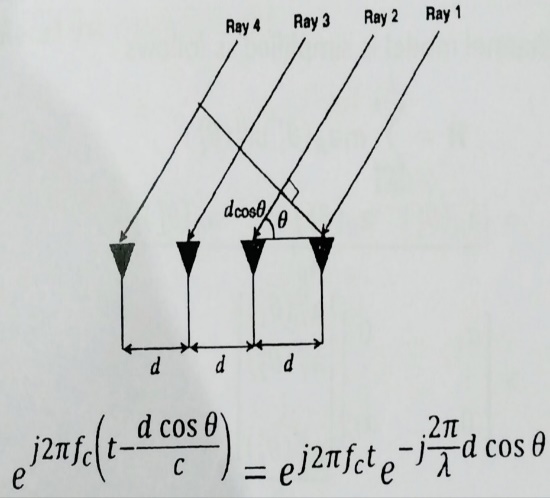
Fig 5.2: Directional cosine vectors at each antenna element (Appendix A)

In figure 5.2, it is illustrated that when transmitted signal reaches at receiver it creates different path lengths at different antenna element. Here in figure the second ray creates path-length difference of dcosθ with the first element. As there will be phase difference for same angle of departure (AOD) rays transmitted from Tx side. The corresponding calculation of phase difference is shown in figure.


People are good at skipping over material they already know!

View Related Topics to


Contact Us

Name

Email *

Message *

Popular Posts

Online Simulator for ASK, FSK, and PSK

Try our new Digital Signal Processing Simulator!   Start Simulator for binary ASK Modulation Message Bits (e.g. 1,0,1,0) Carrier Frequency (Hz) Sampling Frequency (Hz) Run Simulation Simulator for binary FSK Modulation Input Bits (e.g. 1,0,1,0) Freq for '1' (Hz) Freq for '0' (Hz) Sampling Rate (Hz) Visualize FSK Signal Simulator for BPSK Modulation ...

BER vs SNR for M-ary QAM, M-ary PSK, QPSK, BPSK, ...

📘 Overview of BER and SNR 🧮 Online Simulator for BER calculation of m-ary QAM and m-ary PSK 🧮 MATLAB Code for BER calculation of M-ary QAM, M-ary PSK, QPSK, BPSK, ... 📚 Further Reading 📂 View Other Topics on M-ary QAM, M-ary PSK, QPSK ... 🧮 Online Simulator for Constellation Diagram of m-ary QAM 🧮 Online Simulator for Constellation Diagram of m-ary PSK 🧮 MATLAB Code for BER calculation of ASK, FSK, and PSK 🧮 MATLAB Code for BER calculation of Alamouti Scheme 🧮 Different approaches to calculate BER vs SNR What is Bit Error Rate (BER)? The abbreviation BER stands for Bit Error Rate, which indicates how many corrupted bits are received (after the demodulation process) compared to the total number of bits sent in a communication process. BER = (number of bits received in error) / (total number of tran...

Q-function in BER vs SNR Calculation

Q-function in BER vs. SNR Calculation In the context of Bit Error Rate (BER) and Signal-to-Noise Ratio (SNR) calculations, the Q-function plays a significant role, especially in digital communications and signal processing . What is the Q-function? The Q-function is a mathematical function that represents the tail probability of the standard normal distribution. Specifically, it is defined as: Q(x) = (1 / sqrt(2Ï€)) ∫â‚“∞ e^(-t² / 2) dt In simpler terms, the Q-function gives the probability that a standard normal random variable exceeds a value x . This is closely related to the complementary cumulative distribution function of the normal distribution. The Role of the Q-function in BER vs. SNR The Q-function is widely used in the calculation of the Bit Error Rate (BER) in communication systems, particularly in systems like Binary Phase Shift Ke...

Channel Impulse Response (CIR)

📘 Overview & Theory 📘 How CIR Affects the Signal 🧮 Online Channel Impulse Response Simulator 🧮 MATLAB Codes 📚 Further Reading What is the Channel Impulse Response (CIR)? The Channel Impulse Response (CIR) is a concept primarily used in the field of telecommunications and signal processing. It provides information about how a communication channel responds to an impulse signal. It describes the behavior of a communication channel in response to an impulse signal. In signal processing, an impulse signal has zero amplitude at all other times and amplitude ∞ at time 0 for the signal. Using a Dirac Delta function, we can approximate this. Fig: Dirac Delta Function The result of this calculation is that all frequencies are responded to equally by δ(t) . This is crucial since we never know which frequenci...

BER performance of QPSK with BPSK, 4-QAM, 16-QAM, 64-QAM, 256-QAM, etc

📘 Overview 📚 QPSK vs BPSK and QAM: A Comparison of Modulation Schemes in Wireless Communication 📚 Real-World Example 🧮 MATLAB Code 📚 Further Reading   QPSK provides twice the data rate compared to BPSK. However, the bit error rate (BER) is approximately the same as BPSK at low SNR values when gray coding is used. On the other hand, QPSK exhibits similar spectral efficiency to 4-QAM and 16-QAM under low SNR conditions. In very noisy channels, QPSK can sometimes achieve better spectral efficiency than 4-QAM or 16-QAM. In practical wireless communication scenarios, QPSK is commonly used along with QAM techniques, especially where adaptive modulation is applied. Modulation Bits/Symbol Points in Constellation Usage Notes BPSK 1 2 Very robust, used in weak signals QPSK 2 4 Balanced speed & reliability 4-QAM ...

Wireless Communication Interview Questions | Page 2

Wireless Communication Interview Questions Page 1 | Page 2| Page 3| Page 4| Page 5   Digital Communication (Modulation Techniques, etc.) Importance of digital communication in competitive exams and core industries Q. What is coherence bandwidth? A. See the answer Q. What is flat fading and slow fading? A. See the answer . Q. What is a constellation diagram? Q. One application of QAM A. 802.11 (Wi-Fi) Q. Can you draw a constellation diagram of 4QPSK, BPSK, 16 QAM, etc. A.  Click here Q. Which modulation technique will you choose when the channel is extremely noisy, BPSK or 16 QAM? A. BPSK. PSK is less sensitive to noise as compared to Amplitude Modulation. We know QAM is a combination of Amplitude Modulation and PSK. Go through the chapter on  "Modulation Techniques" . Q.  Real-life application of QPSK modulation and demodulation Q. What is  OFDM?  Why do we use it? Q. What is the Cyclic prefix in OFDM?   Q. In a c...

What is - 3dB Frequency Response? Applications ...

📘 Overview & Theory 📘 Application of -3dB Frequency Response 🧮 MATLAB Codes 🧮 Online Digital Filter Simulator 📚 Further Reading Filters What is -3dB Frequency Response?   Remember, for most passband filters, the magnitude response typically remains close to the peak value within the passband, varying by no more than 3 dB. This is a standard characteristic in filter design. The term '-3dB frequency response' indicates that power has decreased to 50% of its maximum or that signal voltage has reduced to 0.707 of its peak value. Specifically, The -3dB comes from either 10 Log (0.5) {in the case of power} or 20 Log (0.707) {in the case of amplitude} . Viewing the signal in the frequency domain is helpful. In electronic amplifiers, the -3 dB limit is commonly used to define the passband. It shows whether the signal remains approximately flat across the passband. For example, in pulse shapi...

Coherence Bandwidth and Coherence Time

🧮 Coherence Bandwidth 🧮 Coherence Time 🧮 MATLAB Code s 📚 Further Reading For Doppler Delay or Multi-path Delay Coherence time T coh ∝ 1 / v max (For slow fading, coherence time T coh is greater than the signaling interval.) Coherence bandwidth W coh ∝ 1 / Ï„ max (For frequency-flat fading, coherence bandwidth W coh is greater than the signaling bandwidth.) Where: T coh = coherence time W coh = coherence bandwidth v max = maximum Doppler frequency (or maximum Doppler shift) Ï„ max = maximum excess delay (maximum time delay spread) Notes: The notation v max −1 and Ï„ max −1 indicate inverse proportionality. Doppler spread refers to the range of frequency shifts caused by relative motion, determining T coh . Delay spread (or multipath delay spread) determines W coh . Frequency-flat fading occurs when W coh is greater than the signaling bandwidth. Coherence Bandwidth Coherence bandwidth is...